

- ▶
- Heaters/Source
- ▶
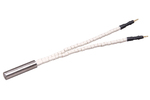
- Agilent Heaters and SensorsMass Spectrometry, Scientific Supplies & ManufacturingScientific Instrument Services 5973 Source Heater Tamper Resistant Allen Wrench 5973/5975 Quad Sensor 5985 Source Heater Assembly Agilent Interface Heater Assembly 5971 Interface Heater
- ▶
- Reference Material on InstrumentationArticle - A High Temperature Direct Probe for a Mass Spectrometer Design of a Direct Exposure Probe and Controller for use ona Hewlett-Packard 5989 Mass Spectrometer SIS AP1000 AutoProbe™ SIS AP2000 AutoProbe™ - Description of System HPP7: Direct Probe Electronics Console HPP7: Direct Probe for the Agilent (HP) 5973/5975 MSD HPP7: HP Direct Probe Application Notes HPP7: Installation Directions for the Direct Probe HPP7: Side Cover for the HP 5973 MSD HPP7: Support HPP7: Probe Inlet System for the Agilent (HP) 5973 and 5975 MSD with Automatic Indexed Stops HPP7: Theory of Operation of the Direct Probe and Probe Inlet System Direct Thermal Extraction Thermal Desorption Application Notes Environmental Thermal Desorption Application Notes Food Science Thermal Desorption Application Notes Forensic Thermal Desorption Application Notes GC Cryo-Trap Application Notes Headspace Application Notes Purge & Trap Thermal Desorption Application Notes Theory of Operation of the AutoDesorb® System AutoDesorb Notes for SIS Dealers Adsorbent Resin Application Notes Installation of the Short Path Thermal Desorption System on Agilent (HP) and Other GCs Installation of the Short Path Thermal Desorption System on a Varian 3400 GC AutoDesorb® System Development Team Thermal Desorption Applications and Reference Materials Installation of the Short Path Thermal Desorption System - TD5 Part I - Design & Operation of the Short Path ThermalDesorption System Installation Instructions for the Model 951 GC Cryo-Trap on the HP 5890 Series GC Installation Instructions for the Model 961 GC Cryo-Trap on the HP 5890 Series GC Operation of the Model 951/961 GC Cryo-Trap SIS GC Cryo Traps - Theory of Operation NIST/EPA/NIH Mass Spectral Enhancements - 1998 version (NIST98) SIMION 3D Ion Optics Class Mass Spectrometer Source Cleaning Methods MS Tip: Mass Spectrometer Source Cleaning Procedures Mass Spec Source Cleaning Procedures Micro-Mesh® Abrasive Sheets Research Papers Using New Era Syringe Pump Systems EI Positive Ion Spectra for Perfluorokerosene (PFK) Cap Liner Information How do I convert between fluid oz and milliliters? Which bottle material should I choose? Which bottle mouth should I choose? The Bottle Selection Guide CGA Connections for Gas Tanks Chemical Reaction Interface Mass Spectrometry (CRIMS)

- Probes
- ▶
- SIS AP1000 AutoProbe™ (This Page)
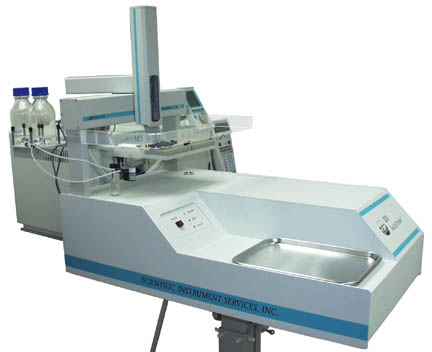
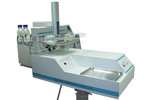
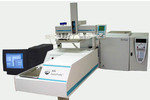
SIS AP1000 attached to the Finnigan TRACE MS.
NOTICE: Please see our newer model AP2000 AutoProbe. This AP1000 is an older model for the TRACE MS.
Automated Direct Insertion Probe for Finnigan TRACE MS™ Mass Spectrometer from Thermo Electron Corp.
Description
The AutoProbe™ System is an Automated Direct Exposure Probe (DEP) for the Finnigan TRACE MS™, PolarisQ, and TRACE DSQ™ Mass Spectrometer systems. The AutoProbe System injects samples directly into the MS source for mass spec sample analysis with no chromatographic separation. This permits samples to be analyzed in 3 minutes or less. The AutoProbe™ operates in the Thermo Finnigan Xcalibur™ MS Software environment and is fully integrated with the Xcalibur™ software, including system setup, methods setup, system operation and data storage. Applications of the direct probe technique include the screening of drug and pharmaceutical samples, quality control sample analysis, spot analysis of chemical reaction mixtures to monitor rates of synthesis, and the analysis of compounds which cannot be chromatographed. The AutoProbe System is used where high volumes of samples need to be analyzed quickly or it can be used in an "Open Access" environment where it can be used by multiple users with minimal MS expertise.
Features
- Automated Direct Probe for continuous analysis of probe samples
- Can be used in Open Access Mode of Operation
- Unattended analysis 200 to 500 samples per day
- MS analysis of samples in 2 to 5 minutes per sample
- Uses Direct Exposure Probe (DEP) Technique (also called DCI)
- Uses CTC PAL Autosampler to load liquid samples onto probe tip
- Long life plug in replaceable probe filaments (expected life > 1000 samples)
- >Long life probe seals (expected life > 2000 injections)
- Analyze samples at a constant current or program in up to three temperature ramps
- Automatic cleaning of filament between samples via high temperature bakeout
- Totally integrated with the Thermo Finnigan Xcalibur software
- Easy to replace probe seals have expected life in excess of 2000 injections
- Automatic injection of probe though an automated vacuum lock isolation valve
- Vacuum gauge in isolation valve eliminates probe from injecting if the system has leaks.
- Automatic error detection designed into the software
- Can use different methods for subsequent samples in a series
Specs
| Voltages |
|
|---|---|
| Fuses | Main fuse: 10 amp slow blow |
| Compressed Air |
|
| Dimensions |
|
| Weight |
|
Mass Spectrometer System Requirements
- Finnigan TRACE™ MS System from Thermo Electron Corp.
- Finnigan Xcalibur™ Version 1.1 or above software (tested up to 1.4)
- Finnigan TRACE MS™ EI/CI Source for the Manual Probe
Components
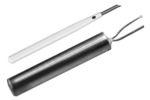
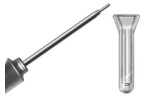
The AutoProbe console is packaged in a white plastic cabinet (Figure # 1) which attaches to the Finnigan TRACE™ MS. The probe rod is attached to a servo linear actuator which serves as the motor to drive the probe through the isolation valve and into the mass spectrometer source. Replaceable DEP probe tips can be plugged into the tip of the probe rod.
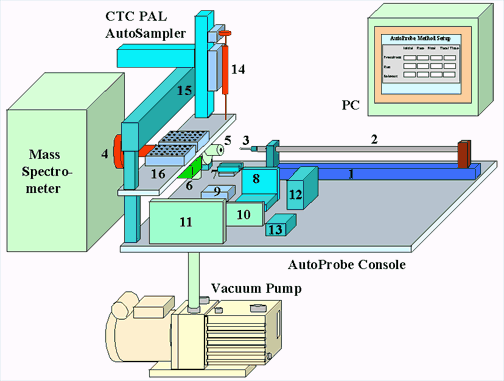
Figure 2 - AutoProbe System Components
Included inside the AutoProbe Console are the following (Figure 2):
- Linear Thrust column
- Probe Rod with replaceable probe tips
- DEP Probe Tip
- MS Probe Interface
- Pneumatic Controlled Isolation Valve Assembly
- Electronic Vacuum Gauge Pressure Sensor
- Two Pneumatic Valves for the servo system
- A Current controlled Power Supply for the probe filament current
- Relay
- CTC PAL Autosampler Power Supply
- AutoProbe Microprocessor Controller operation of the AutoProbe
- Servo Controller for Linear Thrust Column
- Electronic Manifold
- Autosampler Syringe
- CTC PAL Column
Software
The AutoProbe™ is software controlled and fully integrated within the Thermo Finnigan Xcalibur™ MS software. A series of PC windows are integrated into Xcabibur™ to permit the setup of the AutoProbe and the setup of the operational parameters for the AutoProbe. All parameters and methods are saved as part of the Xcalabur™ methods. The AutoProbe is set up in Xcalibur™ as an accessory instrument in the Instrumentation Configuration Window. The method parameters for the operation of the AutoProbe, including ramp rates and times of other system parameters, are entered into data screens controlled within the Xcalibur™ system software.
AutoProbe Software and PC Control
The AutoProbe System has four levels of software that control its entire operation. SIS developed software for the first three levels. The four levels include:
(1) Embedded Software - This resides on the embedded C-programmable microprocessor controller inside the AutoProbe instrument. It directly controls the various hardware components of the AutoProbe, including the servo controller for the linear actuator, the DEP filament current controller, the isolation and rough-pump valves, the vacuum gauge sensor, and the pneumatic valves for the ball valve.
(2) PC-based Instrument Control Software - This controls the AutoProbe instrument from the PC. It does this by communicating with the embedded software (1) via a serial communications link. The PC software sends commands (such as sample run requests) to the embedded software and reads back status data such as the filament current, vacuum readings, the probe position, and operating states. C++, wxWindows, and COM technologies were used. CTC developed their own software for controlling the autosampler. In a typical operation, this layer of software is transparent to the user.
(3) Virtual Instrument Modules - Each instrument of the AutoProbe System is associated with a plug-in module called an "Xcalibur virtual instrument (VI)." These virtual instruments allow instrument vendors to integrate their own instrument control software (2) into the Thermo Finnigan Xcalibur software package (4). Virtual instruments can be thought of as (software) abstractions of instrument hardware. They conform to various standards such as how instruments are configured, methods are set up, and instrument operations are synchronized. Therefore, the entire AutoProbe system is seamlessly integrated into Xcalibur according to the Xcalibur instrument model. SIS developed a VI for the AutoProbe, while CTC and Thermo Finnigan provide the autosampler and MS VI's respectively.
(4) System Control and Analysis Software -Thermo Finnigan Xcalibur software integrates the setup and operation of the virtual instruments (3). It provides a uniform interface for setting up methods and sequences, running samples, collecting data, doing library searches, analyzing results, and printing reports. It also provides an Open Access mode of operation.
As a result of this software integration, the AutoProbe is seamlessly integrated into the Xcalibur software package. The AutoProbe is controlled within the Xcalibur screens and the AutoProbe system status is shown in the Xcalibur system screens.
PC Windows for the Operation of the AutoProbe
In order for the AutoProbe system to operate within the Xcalibur system, Xcalibur must know which devices are being utilized. This is determined in the Xcalabur Instrument Configuration Window. For the operation of the AutoProbe, the PAL Autosampler, SIS AutoProbe and MS systems are selected and configured via the window shown below.
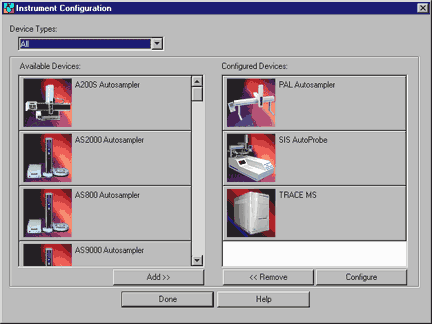
Figure 2 - Xcalabur Instrument Configuration Window
The three instruments are added as shown above.
1. TRACE MS (or PolarisQ or TRACE DSQ)
2. PAL Autosampler
3. SIS AutoProbe
Pressing the SIS AutoProbe Icon above and then pressing "Configure". The following
window appears. This window is used to select the appropriate serial communication port.
clicking "Test" will verify the communication link to the AutoProbe System.
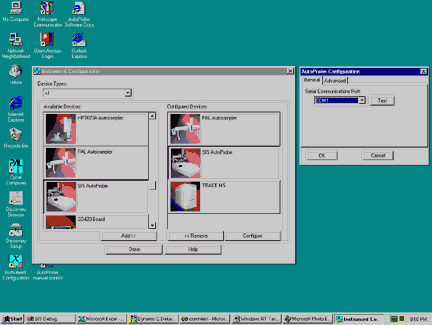
Figure 3 - AutoProbe configuration - select communications port
Selecting the "Advanced" tab on the above window brings up the following window.
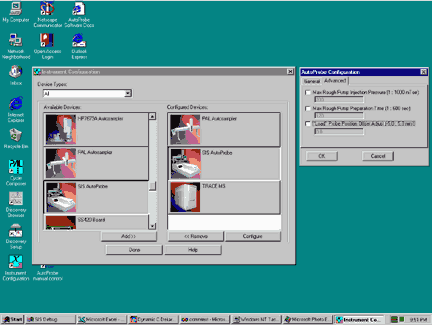
Figure 4 - AutoProbe Configuration Window - Advanced AutoProbe Setup
The settings in the Advanced screen will probably not need to be changed, but they can be changed if necessary.
The one value that may need to be changed here is the Filament "Load" Position. This "Load" position adjustment allows you to position the probe directly under the syringe needle during sample loading. If the alignment of the needle is not correct, the linear position of the probe can be adjusted here to position the syringe needle precisely over the center of the DEP probe tip filament coil.
The "Max Rough Pump Injection Pressure" is the vacuum level to which the isolation valve pump must reach before the isolation valve opens and the probe proceeds in to the source. It is recommended that the value of 200 millitorr be used. The next line, "Max Rough Pump Pressure Time" is the time limit that the vacuum pump has to achieve the above set pressure. It is recommended that this time be set to 120 seconds. If the set vacuum pressure is not reached in the operation of the probe within the 120 seconds time (2.0 minutes), the probe will withdraw from the isolation valve and a vacuum leak warning message will be displayed in the status panel of Xcalibur on the AutoProbe Manual control window.
The screen shown below permits the AutoProbe method to be set up and saved. The AutoProbe method consists of 3 heating steps - Solvent Elimination - Sample Analysis - Bakeout.
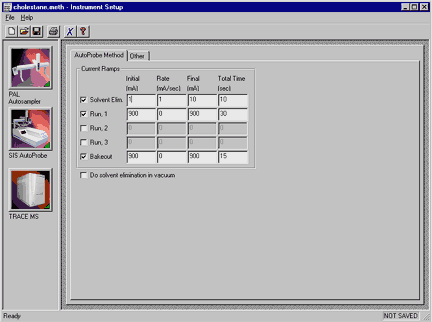
Figure 5 - AutoProbe Window for entering AutoProbe method parameters
Solvent Elimination. Before the sample is analyzed, a small current can be passed through the DEP filament wire to slightly heat the wire and remove the sample solvent. If solvent removal is not required, then uncheck the "solvent elim." checkbox. This step of solvent removal can be done either in atmosphere (before the probe is injected into the vacuum system), or in the vacuum inside the mass spec (before the probe is mated up against the MS source). If the solvent removal is to be done inside the vacuum, then check the "Do solvent elimination in vacuum" checkbox, otherwise the default is for solvent removal to occur at the sample load position (at atmospheric pressure).
Sample Analysis. The DEP filament wire can be run at a constant current rate or with a ramp. Up to three different ramp steps are available. These multiple current ramps can be used in some applications to separate analytes in a sample based on boiling points. Just check the current steps desired in the boxes on the left.
Good results can be obtained by running the filament at a single ballistic constant high current of between 500 and 900 mA. This will provide for a quick heating and desorption of the samples into the mass spec source in the minimum amount of time. The result will be sharp total ion chromatograms and therefore the highest level of sensitivity.
Bakeout. The bakeout mode is used to clean the DEP probe tip between samples to prevent cross contamination of samples. After sample analysis, the probe retracts about 1.5 inches out of the source and the bakeout method occurs in the mass spec vacuum. Normally an isothermal setting of between 800 and 1000 mA for 15 seconds will thoroughly clean the DEP probe tip wire.
The Manual Control Window permits the control or operation of the AutoProbe manually. In some instances it may be necessary to move the probe against the MS source in order to seal the source tightly or align the syringe needle with the DEP wire coil. This can be accomplished in the Manual Control window.
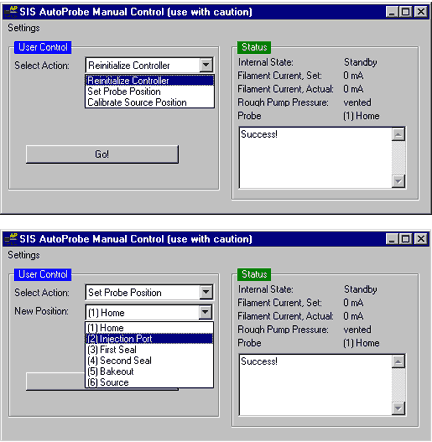
Figure 6 - PC Window for the Manual Control of the AutoProbe
One of the unique features of the Thermo Finnigan Xcalibur software is the ability to operate the mass spectrometer in an Open Access Mode. The Open Access System permits inexperienced chemists and technicians to submit samples directly to the mass spectrometer for analysis. The samples are then analyzed automatically and the results reported back to the chemist with little or no interaction of the mass spectrometer operator. The results are increased productivity from the mass spectrometer lab with less technical staff requirements.
The AutoProbe was integrated into this Open Access mode of operation within the Xcalibur software system. For a sample to be analyzed, the chemist fills out a simple form on a PC screen including the submitters name and sample name. He then selects a method of analysis from one of several standard methods preestablished by the supervisor. After completing the form, the user is instructed where to place his sample. The samples are then analyzed automatically with no operator intervention. The chemist has the option of having the results e-mailed back to him.
The AutoProbe can analyze sample sizes from 500 nanograms down to less than 1.0 nanograms in less than 1.0 minutes of MS analysis time. It requires about 2.0 minutes to inject the sample into and out of the MS vacuum system, for a total time of about 3.0 minutes between samples. In addition the AutoProbe technique has been shown to be very reproducible, quantitative and there are no "memory effects" with this technique as demonstrated in the two application notes listed below.
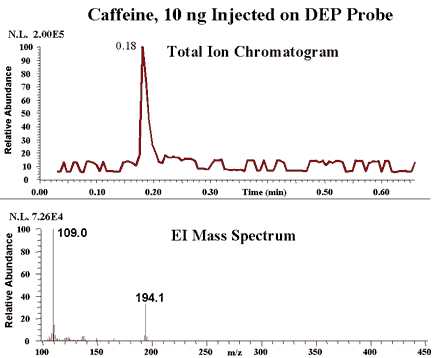
Figure 5 - Typical Sample Analysis via the AutoProbe
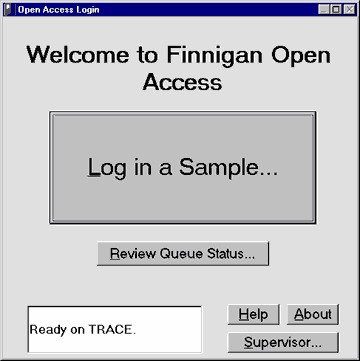
Figure 7 - Operation of the AutoProbe in Open Access
Supplies
The AutoProbe™ System as shipped consists of the following components. A quantity of one of each of the following is included unless otherwise noted below.
- AutoProbe Console with Adjustable Base
- CTC PAL AutoSampler
- SIS AutoProbe System Software Module CD
- Edwards Vacuum Pump
- MS-Probe Interface Tube
- AutoProbe Accessories
- DEP Filament (2 included)
- Source Position Calibration Tip (1 included)
- Probe Seals (1 spare set included)
- Isolation Valve Seal Set (1 spare set included)
- 2 Sample Trays and 1 Pump Tray
- Compressed Air Gas Line - 1/8" O.D. x 20 feet flexible nylon air line
AutoProbe Cables
- Serial Cable - PC to AutoProbe
- Serial Cable - PC to CTC PAL Autosampler
- Remote Start Cable - AutoProbe to MS
- AutoProbe IO Cable - AutoProbe to CTC PAL AutoSampler
- CTC Low Voltage Power Cord
- Main Power Cord for AutoProbe
Accessory Tools
- Allen Wrenches
- Probe Seal Removal Tool
Manuals
- SIS AutoProbe Manual
- CTC PAL Autosampler Manual
Optional Accessories - (must be purchased separately)
- PC Serial Port
- Recommended Spare Parts (must be purchased separately)
- DEP Probe Filaments
Probe Seals
Isolation Valve Seal Set
Reference
For additional details, pricing and ordering information, contact us
 Note 87: Design and Development of an Automated Direct Probe for a Mass Spectrometer Design and Development of an Automated Direct Probe for a Mass Spectrometer
- Note 89: Quantitation of Organics via a Mass Spectrometer Automated Direct Probe Quantitation of Organics via a Mass Spectrometer Automated Direct Probe
 Note 90: An Automated MS Direct Probe for use in an Open Access Environment An Automated MS Direct Probe for use in an Open Access Environment
- Note 91: AutoProbe DEP Probe Tip Temperatures AutoProbe DEP Probe Tip Temperatures