
- ▶
- MSAgilent Bruker Extrel JEOL Kratos Perkin Elmer SCIEX Shimadzu Thermo Varian Waters (Micromass/VG) FLIR/Griffin Inficon/Leybold/Balzers MKS/UTI Hiden Dupont/CEC Nermag Vestec Filaments Heaters/Sensors Wire Material Electron Multipliers Probe/Sample Vials Ion Transfer Tubes MALDI-TOF Supplies Ceramic Insulators Cleaning Supplies Other Filament Repair Source Cleaning NIST MS Library Wiley MS Libraries SIMION® Catalog Page A1 Catalog Page B1
- ▶
- Heaters/Sensors
- ▶
- Agilent Heaters and SensorsMass Spectrometry, Scientific Supplies & ManufacturingScientific Instrument Services 5973 Source Heater Tamper Resistant Allen Wrench 5973/5975 Quad Sensor 5985 Source Heater Assembly 5971 Interface Heater
- ▶
- Mass Spec Calculator Pro™ (This Page)
New 2017 version (5.0)! Now freely downloadable!
Description
This program includes several functions that assist in the evaluation of mass spectra.
- Molecular structure drawing, with simple interface.
- Four different fragmentation tools
- Determine fragments, isotope profiles, and elemental composition
- Accurate mass is supported
- Seamless compatibility with NIST spectrum search, structure similarity search, Mass Spec Interpreter
- Extract a NIST searchable spectrum from a jpg or png
- Calculate isotopic mass distributions for a structure.
A Short Introduction
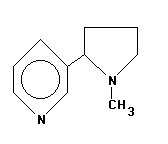
1. To begin using MSC, one would generally first draw a structure. The MSC drawing editor is designed to be very simple and easy to use, and a variety of preformed rings, functional groups and other structures are available to assist in this process. For example, the structure of nicotine can be drawn on screen in seconds in just six steps. This compound was drawn by placing two preformed rings on screen, then adding the bond, two N atoms and the methyl group as added objects.
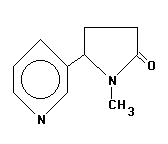
2. The structure could be saved to disk, then converted to cotinine by adding =O in one step to form the lactam structure. The two structures shown here could thus be drawn and saved for later use by using just 7 steps and in less than 30 seconds.
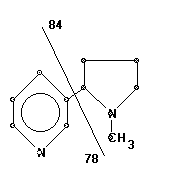
3. Once a structure has been drawn, it can be analyzed in a number of ways. The most fundamental operation is manual fragmentation. This is done just as you would do using paper and pencil, but with electronic speed and accuracy. For example, to examine a homolytic break of the bond linking the two ring structures of nicotine, you would simply draw a line through the bond using the mouse; the program will instantly calculate and display the resulting two fragment masses. The display is color-coded to clearly link the fragment atoms with the associated mass.
This instant manual fragmentation process is interactive and can be repeated as often as desired. Manual fragmentation draws upon your knowledge of likely fragmentation routes to focus your time and effort on the most likely possibilities. There are three different manual fragmentation modes available including a "free-form" option to accommodate any sort of fragmentation you might wish to examine. Multiple and sub-fragmentations of compounds can also be examined, and the display can be instantly switched between nominal and accurate mass resolution.
Auto fragmentation results are only a mouse-click away. In the screen shown below, nicotine has been auto fragmented by MSC and the user has selected mass 39 in the fragment list ... this automatically redraws the structure with the three atoms present in the fragment (C3H3) indicated on screen. This process of identifying specific fragments in the structure can be repeated as often as desired. These results can also be directly compared with the actual mass spectrum, either imported as an ASCII file or recreated within MSC; also, fragment isotope profiles can be instantly calculated and displayed; additional possible fragments including major rearrangement products such as McLafferty or tropylium ions can be identified; etc.
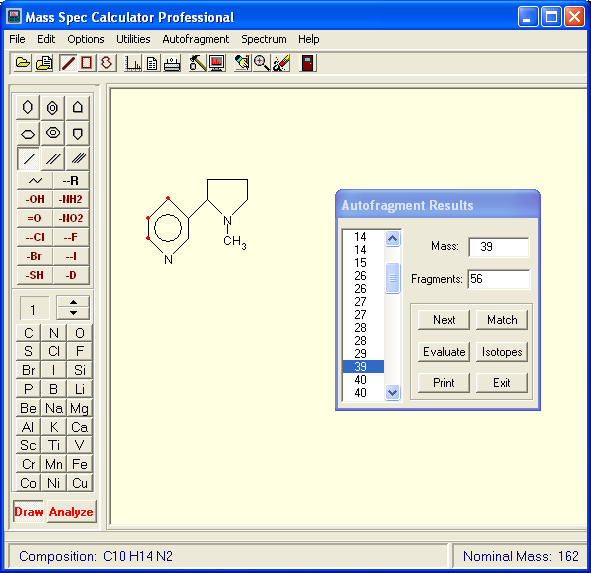
Once a molecule has been auto fragmented, it can also be compared with an observed mass spectrum by choosing the "Match" option button. This enables you to essentially overlay the projected and observed spectra, match predicted and observed isotopic profiles for the molecular ion, and calculate an overall "Match Index" for the actual and predicted spectra.
MSC also includes utilities for determining Isotopic Profiles, for calculating possible elemental compositions given a mass, and for importing user spectral data in a variety of text formats, or creating spectral files directly from data entered onto an internal "spreadsheet".
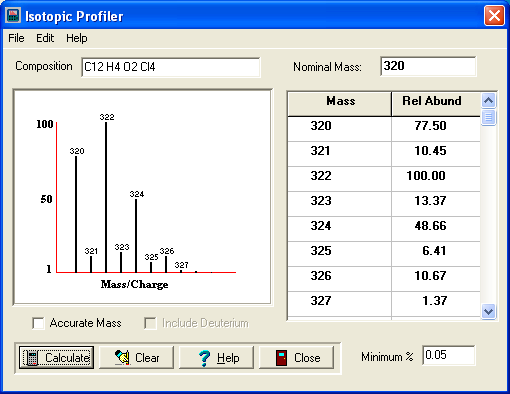
The screen above demonstrates the Isotopic Abundance utility. The user has drawn the structure of dioxin (TCDD) and then clicked on the Isotopic Abundance menu item. MSC automatically incorporated the elemental composition for the TCDD structure, carried out the calculations, and instantly displayed the window shown here displaying the theoretical profile in both text and bar graph form. Compositions can also be entered and edited directly, and additional options such as to display the results in accurate mass form are available.
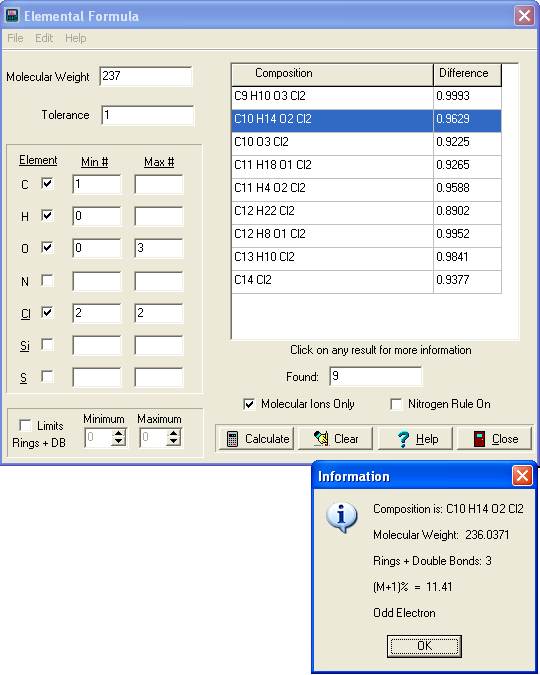
The screen above shows the Elemental Composition utility. You can enter a mass and tolerance, select the elements to be considered (with additional constraints if desired such as to specify the range of an element to include, or only show possible molecular ions, etc.), and then click on the "Calculate" button to have MSC calculate all possible elemental compositions.
System Compatibility
The software can be run on most versions of Windows, including 10, 8.1, 8, 7. (If using the older version 4.0, you'll need winhelp to view the help file.)
Video
Download
Jan 2020 note: This software is now freeware and can be downloaded at https://quadtechassociates.com/#mscalc
 The NIST 26 Mass Spectral Library
& Search Software (NIST 2026/2023/2020/EPA/NIH)Get new licenses for NIST mass spectral library, EI MS spectra, MS/MS, GC data here. Includes electron ionization (EI) data, AMDIS software. Standard, Agilent, Shimadzu, Multiformat available.